Materials: Jerker Desk, treadmill, LCD, Computer
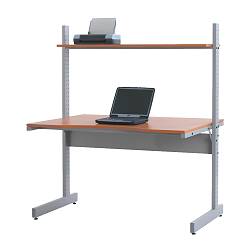
Description: When we were furnishing the new office for work I wanted to match some of our existing IKEA Jerker Desks. Sadly IKEA stopped making them a few years ago and by doing so got rid of one of the best items they ever sold.
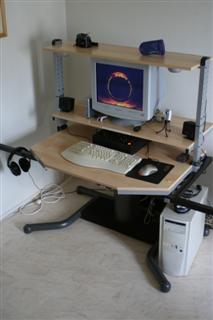
Since they were not made any more I went on a Craigslist quest to buy up a bunch of Jerker desks. Since there are 2 IKEA stores in Chicago most of my day trips were to Chicago and the surrounding areas. I got to see some pretty interesting homes/apartments and hear why people had to sell their beloved Jerker desk. Their loss was my gain and I was able to obtain 6 more Jerker desks. 2 Black, 3 Maple, one Honey colored. All were in great condition. Some came with the extra top shelf and some with the swivel side shelf. On the way to pick up the last desk in Chicago I found a guy in Valparaiso Indiana selling just the top (maple) for $25 bucks so I stopped and purchased that. He also had the set of legs that were in pretty bad condition but he threw them in with the table top. I figured what the heck I could do something with them. I used the top to replace one of the other desk tops since the previous owner did the un holly act of drilling into the top of the desk to mount what looked like a flight simulator controller.
So after getting the office set up we brought in a treadmill to get a little exercise at work, it got some use here and there. A week ago our boss at the corporate office asked if wanted to get a treadmill for the office. We chuckled and said that we already had one and then they asked if we had seen this treadmill desk by TrekDesk. The pictures made it look a little bit like a fold out picnic table with cup holders and it seemed like it may not work well with our treadmill and we would be walking on the very back of the unit. We did some searches and saw that Steelcase had a unit called the Walkstation and thought we could make one for less considering that was $4,199.00. We did a few searches on google and saw other homemade treadmill desks where they took off the top / uprights of the treadmill and stuck it under a desk or just stuck a board over the arm rests for the keyboard and mouse and thought it looked a bit tacky and a little too homemade. We started to think about it and remembered that we had the spare Jerker top and 2 legs and that we could use to make a treadmill desk better than the TrekDesk for almost no money and unlike the Steelcase Walkstation it would still function as a normal treadmill and someone could run on it if they wanted to.
To put together a Jerker desk you only need 2 legs, the table top with the H frame under it, 2 angle braces, and a back cross brace. That is it, a very simple and strong desk. We had the top, the H frame and the legs. We were missing the angle braces and the back cross brace (arrows pointing to parts we had to make). We tore apart the treadmill top to see if we could pull out the electronics and re mount them in the desk or in a custom enclosure. After seeing that everything was a bunch of plastic and the touch-pad built into the curved plastic frame we opted to leave the treadmill in tack and build the desk around the treadmill. Now for those of you that think cutting a big hole in the middle of the Jerker desk table top is a sin, I thought about this for quite a while before doing to. This top was rescued from being set out on the curb and going to the trash dump by the previous owner and the desk surface is probably the easiest part to make if this ever needs to be put back into a normal desk. We did some measuring and testing to find the right height; this was the best feature of the Jerker is that you could put the table top at any height. We determined the optimal height for everyone in the office to make the controls of the treadmill still accessible and provide enough work surface. We took the plunge and cut the hole in the laminate with a jigsaw with a laminate blade. We cleaned up the corners and then edge banded the exposed press-board with some birch edge banding, put a few coats of polyurethane on it and the top was done.
The second part was to make the 2 cross braces that help support the table top at a 45 degree angle We got some metal stock and cut them out and bent them to match the original ones that were missing. You can't tell by the pictures but they are 2 bends so that the brace can mount on the inside of the leg and the outside of the desk top frame. Drilled the holes, sanded / primed the braces. We ran over to Lowes and got some custom paint to match the IKEA grey they used on the Jerker desk and painted the braces.
The third step was to make the bottom back cross brace to give the desk stability so it would not wobble side to side. The original brace is a custom 1/2 inch bent piece of steel with nuts welded in the sides. We opted for a 1 1/2 inch piece of wood with some metal threaded inserts in the sides. We went with 1 1/2 inch wood to avoid the metal threaded inserts from splitting the wood. The board was run through the planer to clean it up a bit, sanded and then primed and painted. The desk was put together and fit perfectly.
Next we picked up a Vizio m320nv 1080p LCD TV on the wall. We got that from Target on sale for $449 on sale from $599. This was the best deal around and actually a decent tv for the price. We mounted that on the wall so that the center was eye level when you are on the treadmill.
Lastly we picked up a AMD Complete DIY Kit from Tigerdirect. It was only $279 for - Asus Mobo, AMD Phenom X3 CPU, CPU Cooler, 2GB DDR2 RAM, ATI Radeon HD 4350, 1TB Seagate HDD, 22X DVD-Writer, PowerUp ATX Case, 400W PSU, Keyboard, Mouse. The computer works well and came with a video card that had hdmi and could output 1080p. We built the machine and mounted it to the side of the Jerker desk with a Safco cpu mount, is an extremely over engineered cpu holder for our computer but we had two of them left over from a purchase on ebay last year where we got 2 for $50 bucks.
The result is a great place to take a walk while still getting some work done or watch a tv show on online.
See more of John's
treadmill desk.
~ John Carter, Ft. Wayne Indiana


 on a technology blog website. More info provide on the link below. Enjoy!